Enterprise networks have changed dramatically over the last decade. Modern businesses depend heavily on cloud applications, online communication tools, remote employees, and offices located in different cities or countries. Because of this, traditional Wide Area Network, or WAN, designs are no longer enough for many organizations.
Earlier, most company applications were stored inside a central data center. Branch offices connected to that data center through private MPLS links. Almost all network traffic first travelled to the data center before reaching the internet or a cloud application.
This model worked well when applications were mainly hosted inside the company.
Today, employees use cloud services such as Microsoft 365, Salesforce, AWS, Azure, video conferencing platforms, and many other online applications. Sending all this traffic through the data center can make the network slower, more expensive, and difficult to manage.
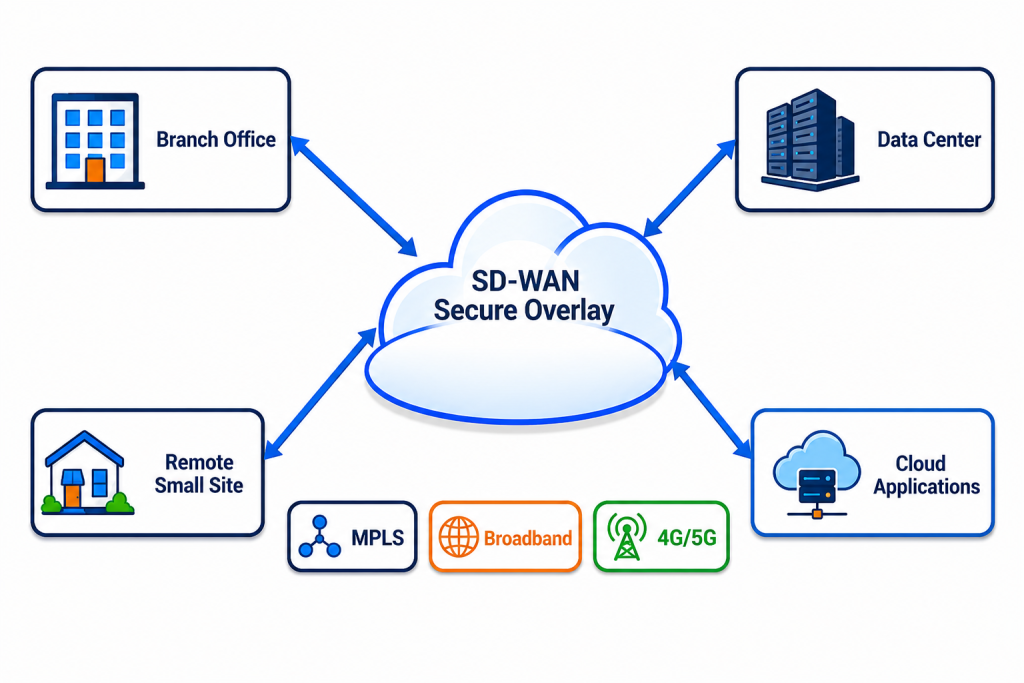
SD-WAN provides a smarter and more flexible way to connect branch offices, data centers, cloud platforms, and remote locations.
What is SD-WAN?
| SD-WAN stands for Software-Defined Wide Area Network. It is a networking solution that uses software-based control to manage traffic across different WAN connections. These connections may include: ~MPLS ~Broadband internet ~Dedicated Internet Access ~Fiber connections ~4G LTE ~5G |
Instead of relying on a single WAN link, an SD-WAN can use multiple links together. It continuously checks the condition of each connection and selects a suitable path for the application.
For example, voice and video traffic can use a low-latency link, while normal web browsing or file downloads can use a lower-cost broadband connection.
The physical links still carry the data, but SD-WAN adds an intelligent software layer over them. This software layer makes the network easier to configure, monitor, secure, and control.
Problems with Traditional WAN Networks
Traditional WAN networks are usually designed around a central data center. Branch offices send their traffic to the data center, where security devices inspect it before forwarding it to the internet. This creates several challenges.
1. Traffic Backhauling
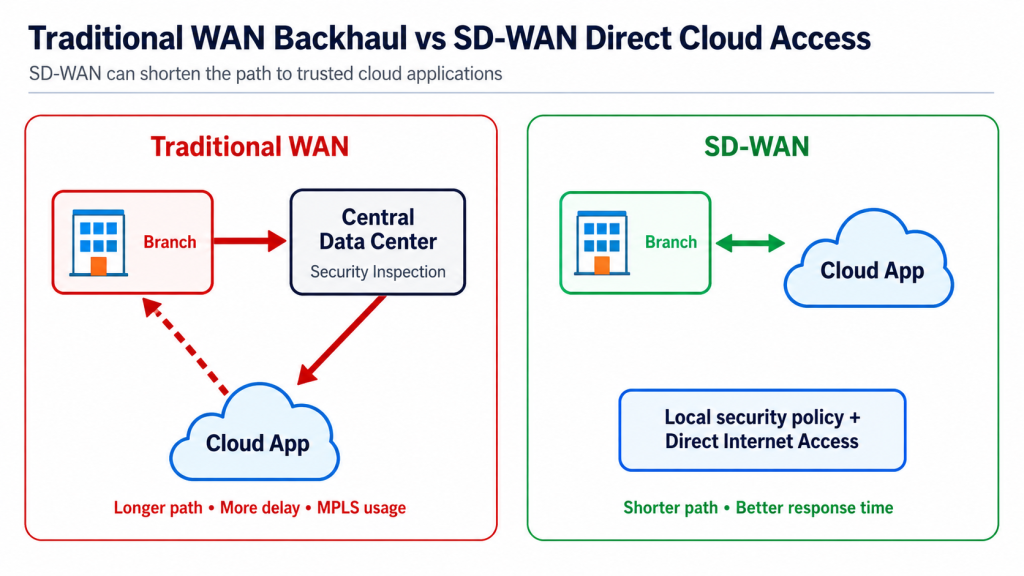
Suppose an employee in a branch office wants to open Microsoft 365. In a traditional network, the traffic may first travel from the branch to the company’s data center. After security inspection, it is sent from the data center to Microsoft 365. The response follows the same long path back to the branch. This unnecessary movement is known as backhauling or the trombone effect. It can increase delay, consume MPLS bandwidth, and reduce the performance of cloud applications.
2. High MPLS Cost
MPLS provides stable and predictable connectivity, but it can be expensive. The cost per megabit is usually higher than standard business broadband. An organization with hundreds of branches may spend a large amount of money on MPLS circuits every month.
3. Slow Branch Deployment
Installing a new MPLS circuit can take weeks or even months. The organization must wait for the service provider to complete the connection. This delay can become a serious problem when a company opens a new branch, temporary office, retail store, or project location.
4. Complex Network Management
In a traditional WAN, engineers may need to log in to every router separately and enter commands through the Command Line Interface. Managing hundreds of devices one by one takes time. It also increases the possibility of configuration mistakes.
5. Limited Network Visibility
Traditional networks may not clearly show which applications are consuming bandwidth or why users are experiencing poor performance. Troubleshooting often starts only after users report a problem.
Why Businesses Need SD-WAN?
| Business applications are no longer located in one central data center. Some may be hosted on AWS, Microsoft Azure, or Google Cloud, while others are delivered as Software as a Service. Employees may also work from branch offices, home offices, customer locations, or different countries. A modern network must therefore connect users directly and securely to the applications they need. SD-WAN helps by choosing better traffic paths, using different types of connections, and allowing direct access to cloud applications without sending every packet through the data center. |
How SD-WAN Works!
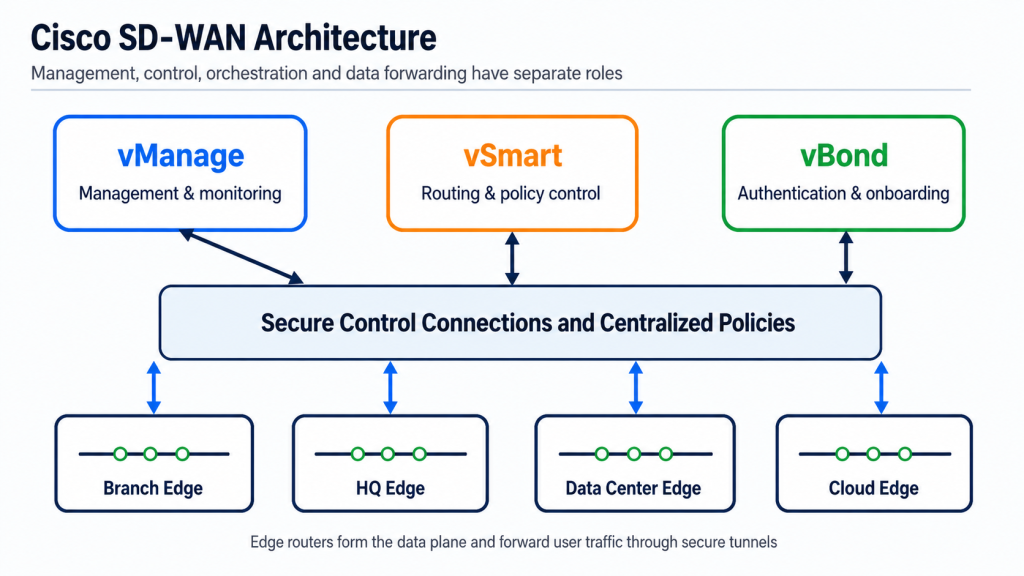
| SD-WAN separates network decision-making from the actual forwarding of traffic. The part that decides how traffic should move is called the control plane. The part that forwards the actual data packets is called the data plane. With centralized control, administrators can create network policies from one dashboard. These policies are then applied to branch routers across the organization. In a Cisco SD-WAN design, the main components include vManage, vSmart, vBond, and edge routers. |
Main Components of Cisco SD-WAN
| 1. vManage: The Centralized Management Plane vManage is the centralized management dashboard. Network administrators use it to: 1. Add and configure devices 2. Create configuration templates 3. Define network policies 4. Monitor WAN links 5. Check application performance 6. View bandwidth usage 7. Troubleshoot network problems Instead of configuring every router separately, administrators can create one template and apply it to multiple devices. This improves consistency and reduces manual errors. |
| 2. vSmart: The Brains of the Control Plane vSmart is the main control component of the SD-WAN network. It receives routing and policy information from edge routers. It then uses centrally defined policies to decide how routes and traffic rules should be distributed. vSmart does not normally carry user data. It mainly handles control information, route distribution, and policies. Keeping user traffic away from the controller helps the network remain scalable. |
| 3. vBond: The Orchestration Plane vBond acts as the initial connection and authentication point. When a new edge router starts, it first contacts vBond. vBond checks whether the router is authorized to join the SD-WAN network. After successful authentication, vBond helps the router locate the required vManage and vSmart controllers. It also supports NAT traversal, which helps devices establish connections when they are located behind firewalls or devices performing Network Address Translation. |
| 4. Edge Routers Edge routers are placed at branch offices, headquarters, data centers, regional hubs, and cloud locations. They connect to physical WAN services such as MPLS, broadband, fiber, LTE, or 5G. They also build secure tunnels with other SD-WAN edge devices. Cisco SD-WAN commonly includes two edge categories: vEdge: These are devices or virtual routers based on the original Viptela platform. cEdge: These are Cisco routers running SD-WAN functions through IOS XE software. Examples may include supported ISR and ASR platforms or Cat8k devices. The edge routers form the data plane because they forward the actual user traffic. |
Major Benefits of SD-WAN
- Faster Deployment with Zero-Touch Provisioning
- Zero-Touch Provisioning allows a new branch router to be installed with very little local technical work. The company can send the router to the branch. A local employee connects the device to power and the internet. The router can then contact the SD-WAN system, authenticate itself, download its configuration, and join the network. This can greatly reduce the time required to open new branches.
2. Application-Aware Routing
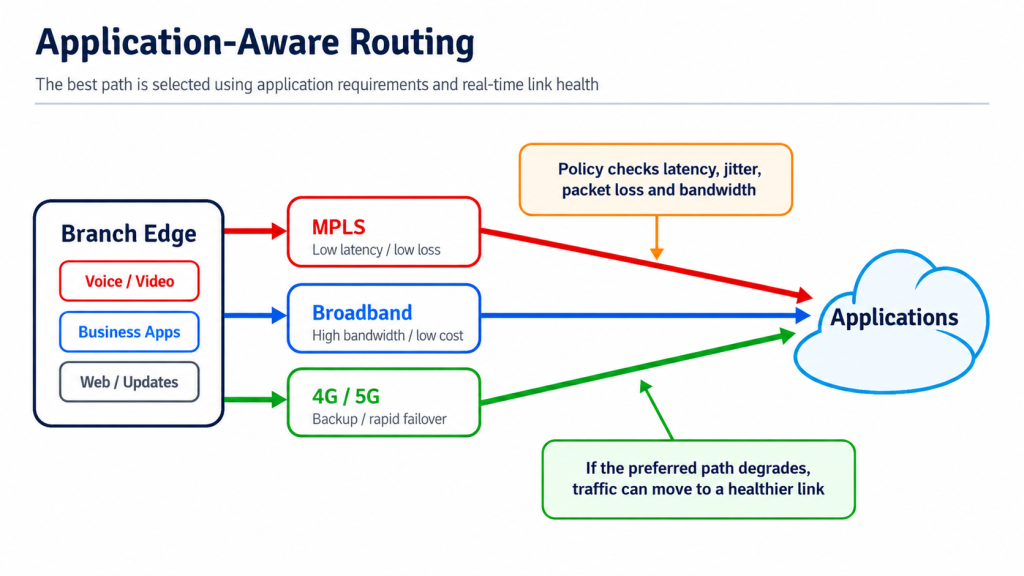
- SD-WAN can identify different types of applications and give each one a suitable network path. It continuously checks link conditions such as: Latency, Jitter, Packet loss and available Bandwidth.
- Voice calls and video meetings are sensitive to delay and packet loss. They can be sent through the best-performing link. Email, web browsing, software updates, or large file transfers may use a lower-cost broadband link.
- When the preferred link becomes unstable, SD-WAN can move traffic to another available connection. The actual failover experience depends on the network design, application, and configured policies.
3. Better Use of Available Bandwidth
- In many traditional networks, the secondary internet link remains unused until the main MPLS link fails. SD-WAN can use both connections at the same time. This is known as an active-active design. Important applications can use MPLS, while less-sensitive traffic uses broadband. This prevents bandwidth from sitting idle.
4. Lower WAN Costs
- SD-WAN does not always require an organization to remove MPLS completely. A company may keep MPLS for important applications while moving other traffic to broadband. It may also reduce MPLS bandwidth and add a faster internet connection.
5. Improved Cloud Performance
- SD-WAN supports Direct Internet Access from branch offices. When a user opens a trusted cloud application, the branch router can send the traffic directly to the cloud instead of forwarding it through the central data center. This can reduce latency, improve application response time, and lower the load on the corporate WAN.
6. Centralized Visibility
- SD-WAN gives administrators a central view of the network. They can see link performance, application usage, packet loss, latency, bandwidth consumption, device health, and security events. This allows the IT team to identify problems earlier and make better decisions.
How to Implement SD-WAN?
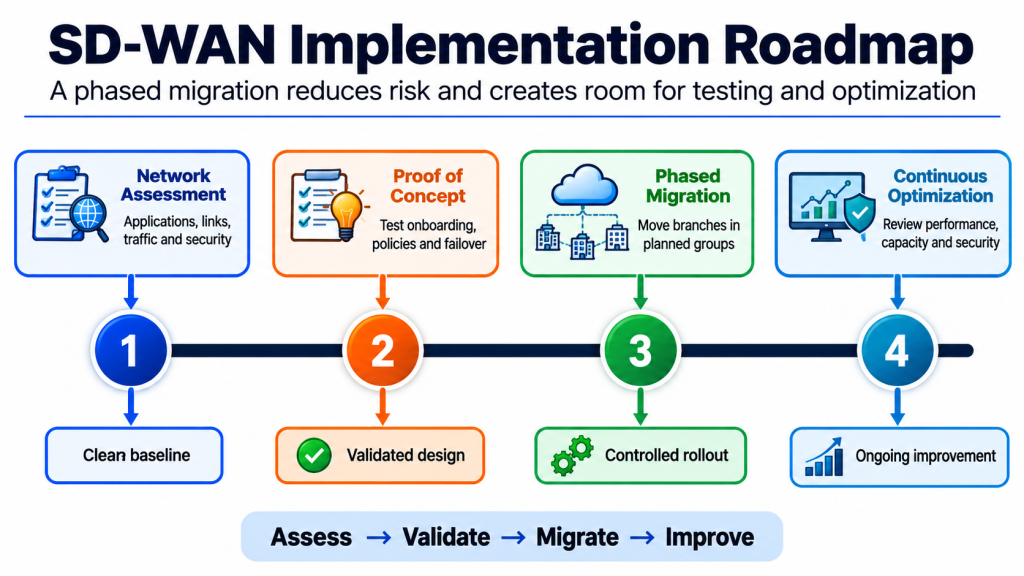
A successful SD-WAN migration should be completed in planned stages.
| Phase 1: Network Assessment: The organization should study its existing network, applications, WAN links, traffic patterns, security requirements, and business-critical services. Applications should be grouped according to their performance needs. | Phase 3: Phased Migration: Branches should be migrated in planned groups rather than changing the entire network at once. During migration, MPLS and SD-WAN may operate together. Existing services should be removed only after the new network has been properly tested. |
| Phase 2: Proof of Concept: A small number of non-critical branches should be selected for testing. The team should test device onboarding, templates, application-aware routing, security policies, failover, and monitoring. | Phase 4: Continuous Optimization: After deployment, administrators should regularly review application performance, link quality, policies, security alerts, and bandwidth usage. SD-WAN is not a one-time configuration. It should be adjusted as applications and business requirements change. |
Conclusion:
SD-WAN gives enterprises a more flexible way to connect branches, data centers, cloud platforms, and remote locations. It can improve application performance, simplify network management, speed up branch deployment, make better use of available links, and reduce dependence on expensive MPLS circuits. Most importantly, SD-WAN allows the network to respond to real-time link conditions and application requirements. For cloud-focused and distributed organizations, it can provide a strong foundation for building a more agile, visible, secure, and reliable enterprise network.
Frequently Asked Questions!
SD-WAN stands for Software-Defined Wide Area Network. It is a networking solution that centrally manages traffic across multiple connections, such as MPLS, broadband, fiber, 4G, and 5G.
SD-WAN continuously checks link performance and automatically sends application traffic through the most suitable path. This improves network performance, security, reliability, and management.
Companies are moving to SD-WAN mainly because it offers superior application performance, quicker implementation, increased visibility, and comes with built-in security features. In fact, it is a great way of overcoming the negatives of legacy systems (expensive and tightly coupled) in a cloud-centric world.
What is the difference between SD-WAN and MPLS?
MPLS is a dedicated, service-provider-managed WAN connection that offers reliable performance but is usually expensive.
SD-WAN is a software-based solution that can use multiple connections, such as MPLS, broadband, fiber, 4G, and 5G. It automatically selects the best path based on application needs and link performance.
In simple terms: MPLS is a WAN transport technology, while SD-WAN intelligently manages different WAN transports, including MPLS.
To learn SD-WAN, first build a strong understanding of routing, WAN technologies, VPNs, and network security. Then study SD-WAN architecture, controllers, policies, application-aware routing, and link failover. Practise configuration and troubleshooting using Cisco SD-WAN labs, simulators, or virtual environments.
For structured, hands-on learning, explore the Cisco SD-WAN Training Course at Network Bulls, designed to help networking professionals develop practical deployment and troubleshooting skills.
What is the future of SD-WAN in enterprise networking?
The future of SD-WAN is cloud-focused and security-integrated. It will increasingly combine with SASE and zero-trust security, use AI for automatic troubleshooting and traffic optimisation, support hybrid and multicloud environments, and manage broadband, MPLS, 5G, and other links through one central platform. SD-WAN will remain a key technology for building secure, flexible, and automated enterprise networks.