
Objective: Understanding First Hop Redundancy Protocols (FHRP) and their importance in maintaining absolute network availability.
The Danger of the Single Exit Door
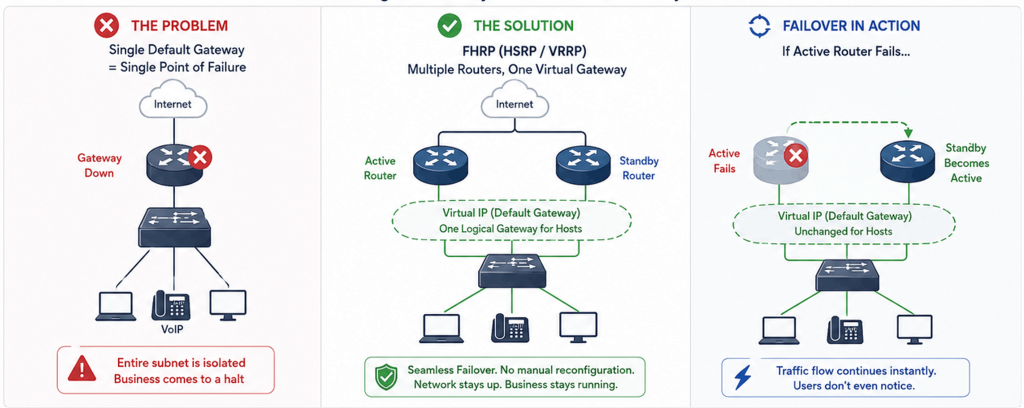
In the modern enterprise network, uptime is not just a metric; it is the absolute foundation of business operations. When a user connects to a network, their device is assigned an IP address, a subnet mask, and a default gateway. This default gateway is the exit door- the crucial router or Layer 3 switch that connects the local network to the rest of the world, including other corporate sites and the Internet. But what happens if that single exit door breaks, loses power, or experiences a catastrophic hardware failure?
If a network relies on a single physical router as the default gateway, the entire subnet can become isolated the moment that device fails. The immediate business impact can include:
- Users are unable to reach cloud applications or other remote resources.
- VoIP phones can drop active calls.
- Business productivity can come to a sudden halt.
- Recovery may require engineers to manually reconfigure many devices with a new default gateway address.
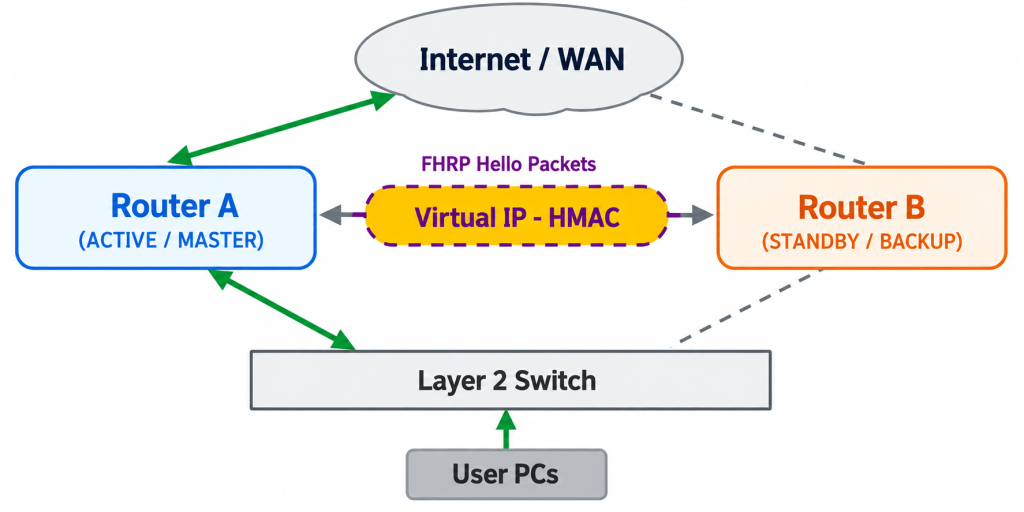
FHRPs eliminate this single point of failure by grouping multiple physical routers into one logical gateway. From the end-user perspective:
- Devices continue to use a single, reliable default gateway.
- Multiple routers work in the background as a redundancy group.
- If the primary router fails, another router can take over automatically.
This blog will focus entirely on the two most prominent protocols in the industry: Hot Standby Router Protocol (HSRP) and Virtual Router Redundancy Protocol (VRRP). We will focus purely on how they operate, how they handle failures, and how they direct traffic flow in real-world enterprise environments.
The Engine of High Availability: Virtual IPs and MACs
To truly understand HSRP and VRRP, we must first understand the magic trick they perform at Layer 2 and Layer 3 of the OSI model. Both protocols use the same fundamental concept: the Virtual IP (VIP) and the Virtual MAC address.
Instead of using the physical IP address of Router A or Router B as the default gateway, the user device is configured with a Virtual IP (VIP). Key points are:
- The Virtual IP does not physically exist on a specific network interface card.
- The Virtual IP is shared by the routers participating in the redundancy group.
When a computer needs to send traffic to the Internet, it first resolves the Virtual IP into a MAC address using ARP. The process is:
- The computer broadcasts an ARP request asking who owns the Virtual IP address.
- Only the router currently acting as Active or Master responds.
- That router replies with the dynamically generated Virtual MAC address.
Now, the computer packages its data, places the Virtual MAC address in the destination field of the Ethernet frame, and sends it out. The local network switches, which learn MAC addresses by observing traffic, naturally direct this frame to the physical port where the Active router is connected. Traffic flows smoothly out of the network.
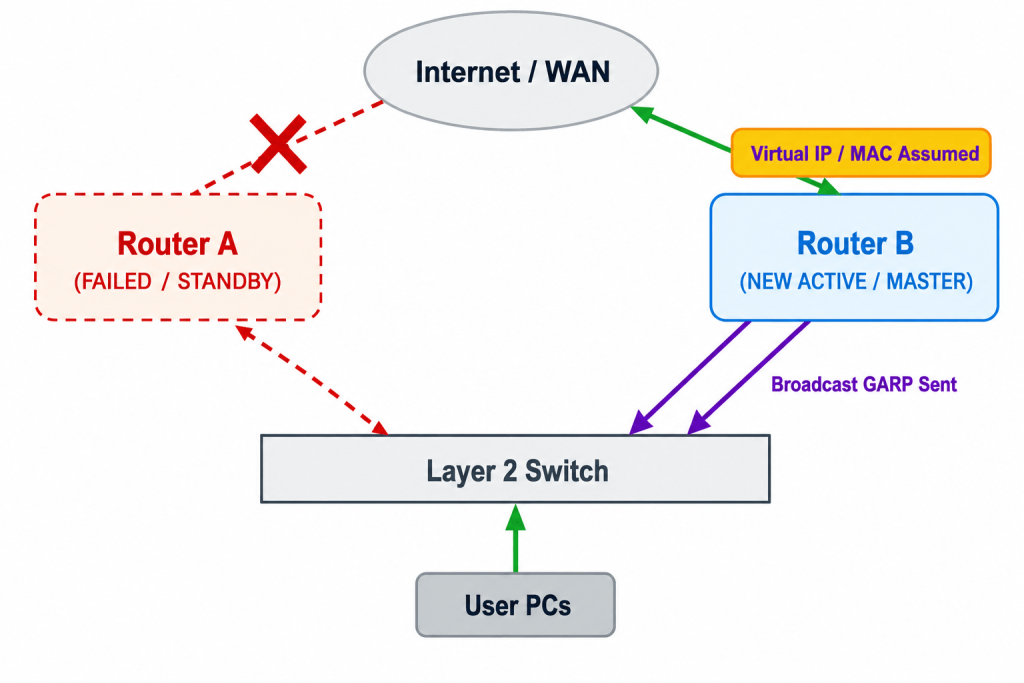
If the Active router fails, the backup detects the loss of periodic hello messages and begins the failover process.
| During this transition: |
1. The backup router promotes itself to the Active role. |
2. It takes ownership of both the Virtual IP address and the Virtual MAC address. |
3. It immediately sends a Gratuitous ARP (GARP). |
4. The switches update their MAC address tables and redirect forwarding toward the newly active router. |
5. The end-user device keeps the same gateway IP and MAC address while traffic shifts to the backup hardware. |
HSRP: Cisco’s Heavyweight Champion
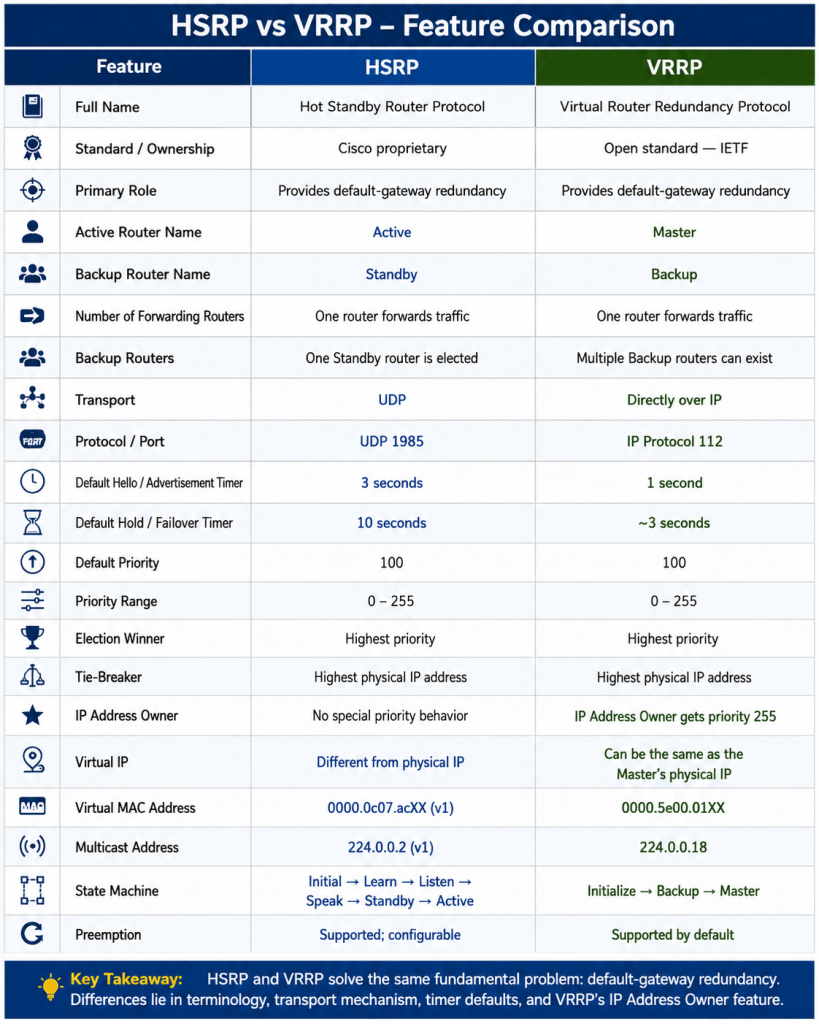
Hot Standby Router Protocol (HSRP) is Cisco’s proprietary FHRP and remains one of the most widely deployed redundancy protocols in the world. HSRP is designed to provide seamless failover by electing a single “Active” router to forward traffic, while a second router waits in a “Standby” state, silently monitoring the health of the Active router.
| HSRP routers communicate with each other using multicast UDP packets on port 1985. By default: • Hello messages are exchanged every 3 seconds. • The Hold timer is 10 seconds. • If the Standby router does not hear a Hello within the Hold time, it assumes the Active router has failed and takes over forwarding. |
| HSRP election is controlled by priority. The main election rules are: • Priority values range from 0 to 255. • The default priority is 100. • The router with the highest priority becomes Active. • If priorities are equal, the router with the highest physical IP address on the interface wins the tie. |
| HSRP version 1 uses a predictable Virtual MAC address format, which is useful during troubleshooting: • Format: 0000.0c07.acXX • XX represents the HSRP group number in hexadecimal. • Example: HSRP group 10 uses 0000.0c07.ac0a. |
| HSRP uses a strict state machine before a router becomes Active. The normal progression is: • Initial • Listen • Speak • Standby • Active This deliberate progression helps ensure the router is ready to forward traffic before it takes responsibility as the default gateway. |
VRRP: The Open Standard Alternative
While HSRP is fantastic for all-Cisco environments, modern enterprise networks frequently use hardware from multiple vendors. This is where the Virtual Router Redundancy Protocol (VRRP) comes in. VRRP is an open-standard protocol that performs the exact same primary function as HSRP but with a slightly different operational vocabulary and a few unique mechanical differences.
| VRRP uses different role names for the same redundancy concept: • The router currently forwarding traffic is called the Master. • Other routers in the redundancy group are called Backup routers. • VRRP can have multiple Backup routers listening for the Master to fail. |
| VRRP operates directly over IP using protocol number 112 rather than UDP or TCP. Its default timing behavior includes: • The Master sends multicast advertisements every 1 second. • If a Backup router misses three consecutive advertisements, it begins the failover process. • These tighter default timers provide faster out-of-the-box recovery than legacy HSRP version 1. |
Both HSRP and VRRP can be tuned to sub-second timers for modern high-availability requirements.
A Virtual MAC beginning with 0000.0c07.ac… indicates HSRP.
A Virtual MAC beginning with 0000.5e00.01… indicates VRRP.
A packet capture can therefore reveal the FHRP in use by examining the destination MAC address.
VRRP election also relies on a priority system. Important rules include:
- Priority values range from 0 to 255, with 100 as the default.
- The router with the highest priority becomes the Master.
- If the Virtual IP matches a router interface’s physical IP, that router becomes the IP Address Owner with priority 255.
- The IP Address Owner becomes the absolute Master.
- This differs from HSRP, where the physical IP and Virtual IP remain distinct.
VRRP uses a standardized Virtual MAC address format:
- Format: 0000.5e00.01XX
- XX is the hexadecimal representation of the VRRP group ID.
- Seeing this Virtual MAC move between switch ports during an outage is a strong indicator of VRRP failover.
Operational Context: Failover, Preemption, and Object Tracking
Understanding the basic Active/Standby or Master/Backup roles is only half the battle. In a live enterprise environment, simple router failures (where a box completely loses power) are relatively rare. Far more common are partial failures, such as a router losing its uplink connection to the Internet while remaining perfectly healthy on the local area network side. If we only rely on basic FHRP hello packets, we run into a massive problem: blackholing.
| A common blackholing scenario can occur even when the router itself is still powered on: • Router A is the Active HSRP router and receives user traffic. • Router A’s fiber connection to the Internet Service Provider is cut. • Its local network interface remains healthy, so it continues sending HSRP Hello messages. • Router B remains Standby because it still sees Router A as alive. • User traffic sent to Router A is dropped because Router A no longer has a working external path. |
| Object Tracking prevents this type of silent failure by allowing the FHRP process to monitor external conditions such as: • The line-protocol state of an uplink interface. • Reachability to an external IP address using IP SLA. If the tracked object fails, the router’s FHRP priority can be dynamically reduced. |
| In the Router A example, the priority change can work like this: • Router A starts with HSRP priority 110. • Its Internet link fails and Object Tracking lowers its priority to 90. • Router B retains the default priority of 100 and therefore becomes the higher-priority router. • For Router B to actually take over, Preemption must be enabled. |
| With Preemption enabled, the failover completes as follows: • Router B detects that its priority is now higher than Router A’s degraded priority. • Router B takes over the Active or Master role. • It sends a Gratuitous ARP so the Virtual MAC is relearned on the healthy path. • Traffic shifts away from the failed uplink and toward the healthy router. Object Tracking combined with Preemption is a key characteristic of a professionally designed redundant network. |
Design Considerations: Strategic Load Sharing
HSRP and VRRP do not automatically load-balance traffic across multiple routers for a single subnet. For any given subnet: One router acts as Active or Master and handles the forwarding workload, and the other router remains Standby or Backup and waits for a failure.
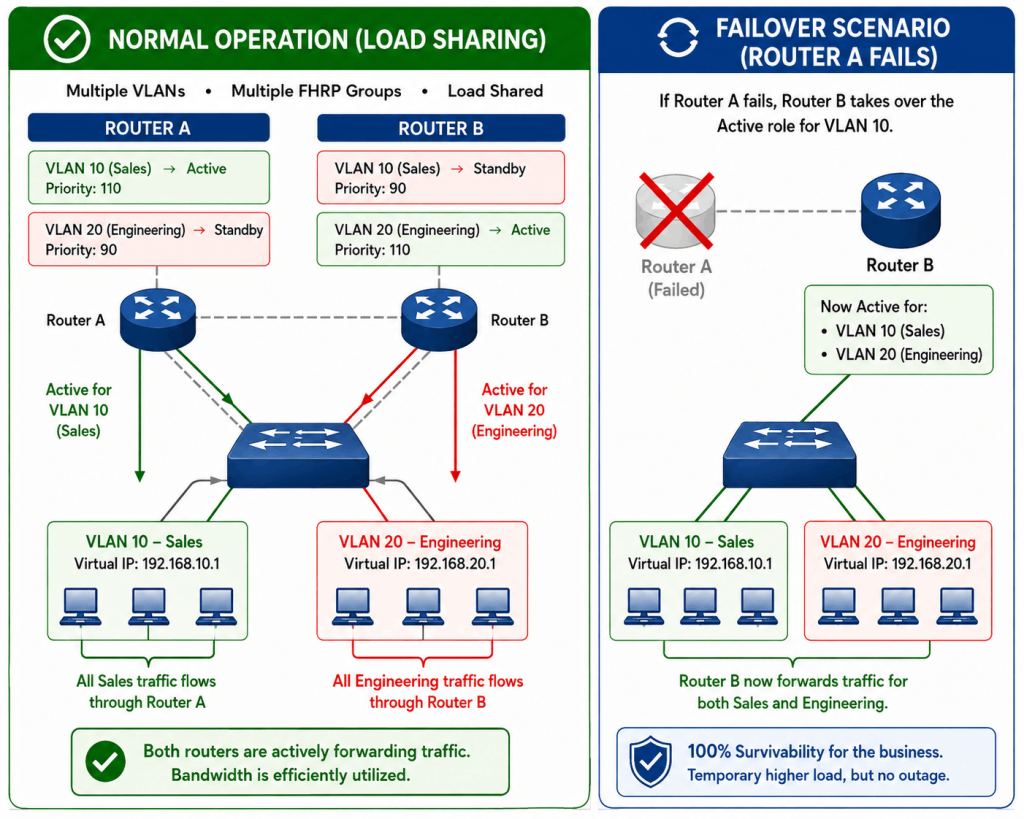
However, enterprise infrastructure teams do not want expensive hardware sitting completely idle. To achieve highly efficient traffic engineering and load sharing, we leverage multiple VLANs and multiple FHRP groups.
A campus with VLAN 10 (Sales) and VLAN 20 (Engineering) can still use multiple FHRP groups to share traffic strategically:
- Router A is Active for VLAN 10 with priority 110 and Standby for VLAN 20 with priority 90.
- Router B is Active for VLAN 20 with priority 110 and Standby for VLAN 10 with priority 90.
- Under normal conditions, Sales traffic flows through Router A.
- Engineering traffic flows through Router B.
- Both routers therefore participate in forwarding, but for different VLANs and FHRP groups.
If Router A fails, Router B seamlessly takes over the Active role for VLAN 10, meaning it is now forwarding traffic for both Sales and Engineering. While this might temporarily congest Router B during an outage, it ensures 100% survivability for the business. This strategic use of multiple FHRP groups is the standard best practice in modern campus network design, providing both redundancy and optimized load sharing without requiring complex layer 2 spanning tree manipulations.
Check 100% Job Guarantee Courses
- CCIE Enterprise Infrastructure V1.0/R&S Training in India
- CCIE Security V6.1 Course
- Cyber Security & Network Security Course
- Cloud Security + Network Security Expert
Frequently Asked Questions (FAQs)
HSRP version 1 uses the multicast address 224.0.0.2 and supports group numbers from 0 to 255. HSRP version 2 was updated to use the multicast address 224.0.0.102 and expands the group number range from 0 to 4095. Version 2 also adds support for IPv6. They are not mutually compatible on the same interface.
Yes, it is entirely possible to run HSRP and VRRP on the same physical network segment, provided they are configured for completely different subnets or VLANs. Because they use different multicast addresses, protocol numbers, and virtual MAC structures, they will ignore each other’s control traffic. However, running both for the same subnet is illogical and will cause severe IP conflicts.
GARP is the mechanism that actually moves the traffic flow during a failover. When a Standby/ Backup router becomes Active/Master, it sends a broadcast GARP containing the Virtual MAC address. This tells all Layer 2 switches in the network to immediately update their MAC address tables and point the Virtual MAC to the physical switch port connected to the newly promoted router. Without GARP, traffic would continue flowing into a black hole until the switches’ MAC tables naturally timed out.
Cisco designed HSRP to prioritize stability over optimal routing. If an Active router reboots, it might come back online before its routing tables are fully built. If it preempted immediately, it might drop traffic. Thus, Cisco requires engineers to manually enable preemption (often with a delay timer). VRRP, designed by the IETF, takes the opposite philosophy, assuming the highest priority router should always handle traffic the moment it is available.
If the entire network infrastructure, from the access switches to the core routers, consists entirely of Cisco hardware, HSRP is generally preferred due to its deep integration with other Cisco features (like optimized tracking and EEM scripts). However, if the network is multi-vendor (e.g., a mix of Cisco, Juniper, and Arista), VRRP is the mandatory choice, as it is an open standard supported by every major networking vendor.