In today’s connected world, networking technology has become essential not only for businesses and educational institutions but also for smart homes. Imagine your network as a busy city where computers, servers, printers, IP phones, wireless devices, and security cameras are constantly exchanging information. Without proper organization, this traffic can quickly become congested, leading to reduced performance, security vulnerabilities, and management challenges.
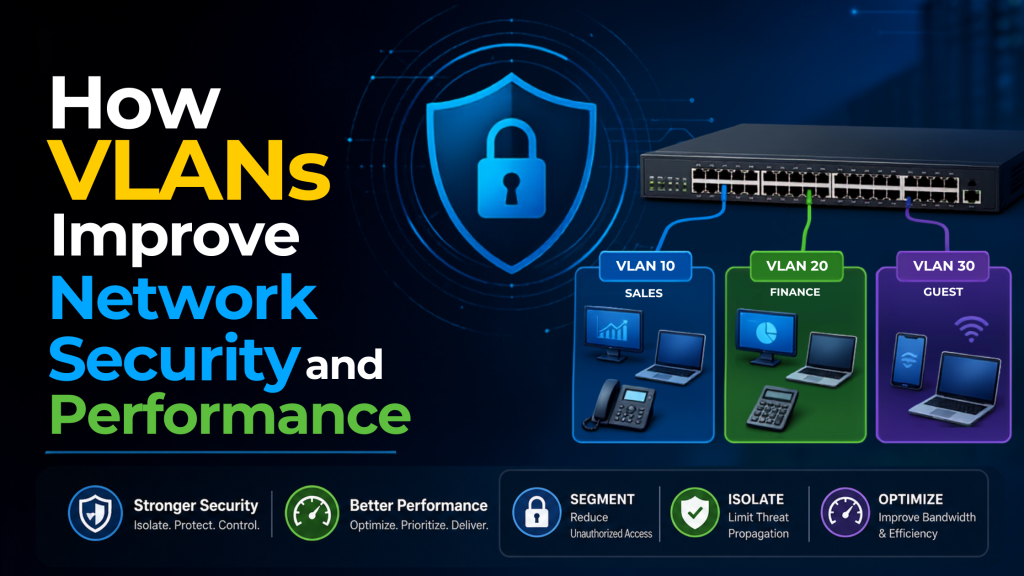
This is where Virtual Local Area Networks (VLANs) come into play. VLANs logically divide a physical network into multiple isolated networks, allowing administrators to control traffic flow, improve security, and optimize network performance. By separating devices into different VLANs based on their function, department, or security requirements, organizations can reduce unnecessary broadcast traffic and create a more efficient network environment.
Whether you are a network administrator, IT professional, business owner, or technology enthusiast, understanding VLANs is essential in today’s digital landscape. VLANs not only simplify network management but also play a critical role in enhancing security, improving scalability, and ensuring reliable communication across modern networks.
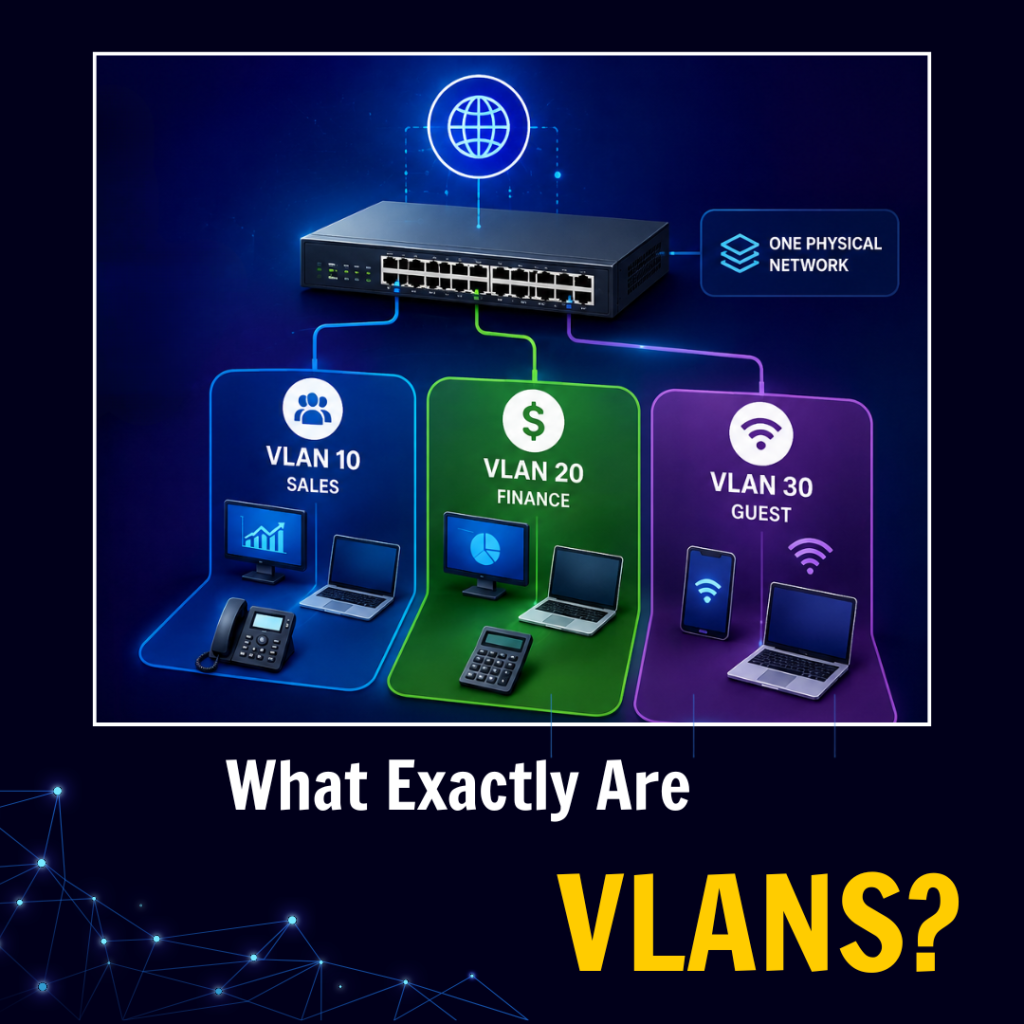
What exactly are VLANs?
VLANs can be compared to apartments within a building. Although all residents share the same physical structure, each apartment is logically separated. Similarly, devices may connect to the same physical switch, but VLANs logically divide the network into separate segments
According to the IEEE 802.1Q standard, each VLAN is identified by a VLAN ID ranging from 1 to 4094. VLAN tags ensure that traffic is forwarded only to devices belonging to the same VLAN, improving security, reducing broadcast traffic, and simplifying network management.
Understanding Virtual Local Area Networks
The Basic Concept
A Virtual Local Area Network (VLAN) is a logical network that groups devices together regardless of their physical location. VLANs allow devices to communicate as if they were connected to the same physical network while remaining logically separated from other groups.
VLANs operate at Layer 2 (Data Link Layer) of the OSI model and use the IEEE 802.1Q standard to identify traffic. The 802.1Q protocol inserts a 4-byte VLAN tag into Ethernet frames, enabling switches to forward traffic only to devices that belong to the same VLAN.
How VLANs Differ from Traditional Networks
In standard network designs, all network devices share a common broadcast domain within the network. This means that a message transmitted on one device in the network, such as a request to identify the location of the printer, will be picked up by all other devices in the network, regardless of whether it was necessary or not.
This issue is overcome through VLANs, where several broadcast domains are created through the use of the same physical network.
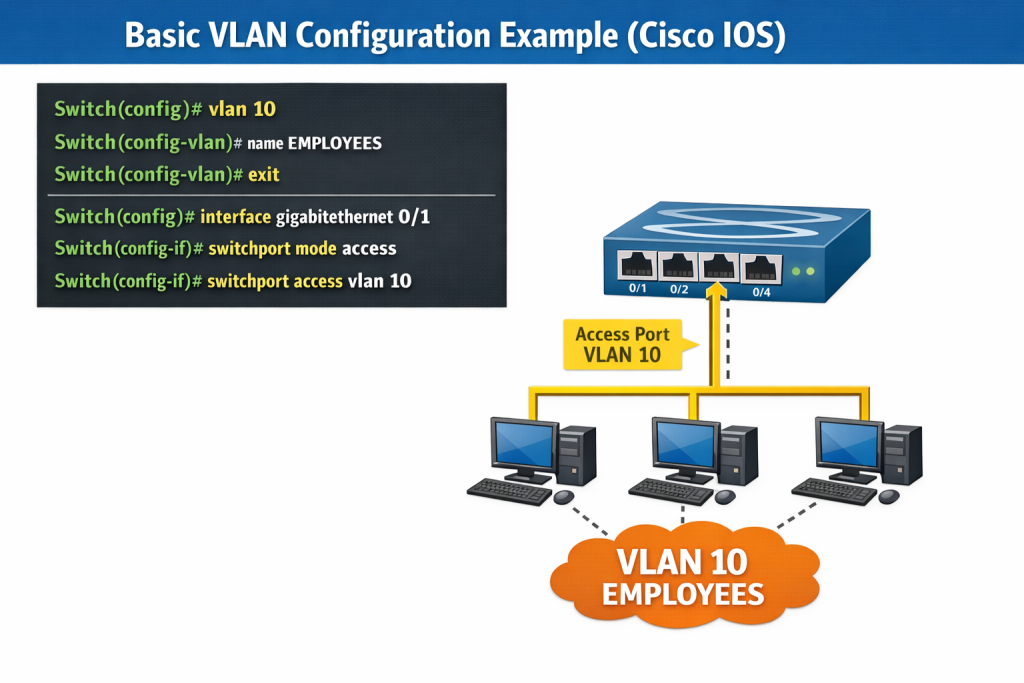
The Security Superpowers of VLANs
1. Network Segmentation: The First Layer of Protection
The biggest security advantage of VLANs is network segmentation, which means partitioning your network to establish a natural barrier, protecting against security breaches and reducing an attacker’s ability to move laterally.
How Segmentation Protects You:
| Protection Against Breaches: | When malware compromises a device on the “Guest WiFi” VLAN, the breach will not automatically jump to other devices in the “Financial Data” VLAN because the transfer has to pass through a routing point. |
| Limited Attack Surface: | Intruders will only be able to target devices on their VLAN, limiting the possible victims of the attack |
| Separation of Sensitive Data: | Critical components such as HR systems, financial data, and security cameras can operate in isolated VLANs |
2. Access Control and Enforcement of Policy
Access control policies can be enforced very flexibly using VLANs, something that is not possible in the case of flat network architecture. One may define security policies based on which VLANs may communicate with one another and the type of communication allowed.
Example VLAN Security Policy:
| EMPLOYEES_VLAN: has internet, servers, and printers access. Can’t connect to GUEST_VLAN and SERVER_MANAGEMENT_VLAN networks. Has limited bandwidth of 100mbps. |
| GUEST_VLAN: has internet connection only. Can’t connect to internal networks at all. Limited bandwidth of 25mbps. |
| SERVER_MANAGEMENT_VLAN: has access to all servers. Can’t connect to users’ machines and GUEST_VLAN network. Unlimited bandwidth. |
3. Protection from Broadcast Storms
Broadcast storm is the phenomenon where there are too many broadcast messages sent in the network, leading to consumption of bandwidth and processing power. On a flat network, even one misconfigured device will take your whole network down. VLAN ensures that broadcast storms only affect the specific VLAN that caused it.
Performance Benefits That Go Beyond Security
1. Reduced Broadcast Traffic
With 1,000 devices on the network environment, every broadcast will be sent to all 1,000 devices. With 10 VLANs and 100 devices per VLAN, the broadcast is only sent to 100 devices. Less broadcast traffic translates to improved performance for you.
Effects on Network Performance
| Prior to VLAN deployment: 1,000 devices x broadcast traffic overhead = 100% impact on network |
| After VLAN deployment: 10 VLANs x 100 devices x broadcast traffic overhead = 10% impact on network |
2. Efficient Bandwidth Usage
By making use of VLANs, you can implement QoS policies that ensure high priority traffic is prioritized according to departments or functions such as ensuring voice calls have priority over file downloads.
3. Increased Network Efficiency
By minimizing the amount of devices which utilize the available bandwidth within each broadcasting domain, VLAN leads to increased network efficiency. This allows for faster transfer of files for the specific department, reduced latency for real-time applications, and increased predictability under peak hours of network usage.
4. Scalability without Changes to Physical Infrastructure
With the addition of new departments or new members of staff to the network, there is no need to install any new cables and to buy new switches. All that needs to be done is create a new VLAN and configure it for use.
Real-World VLAN Implementation Scenarios
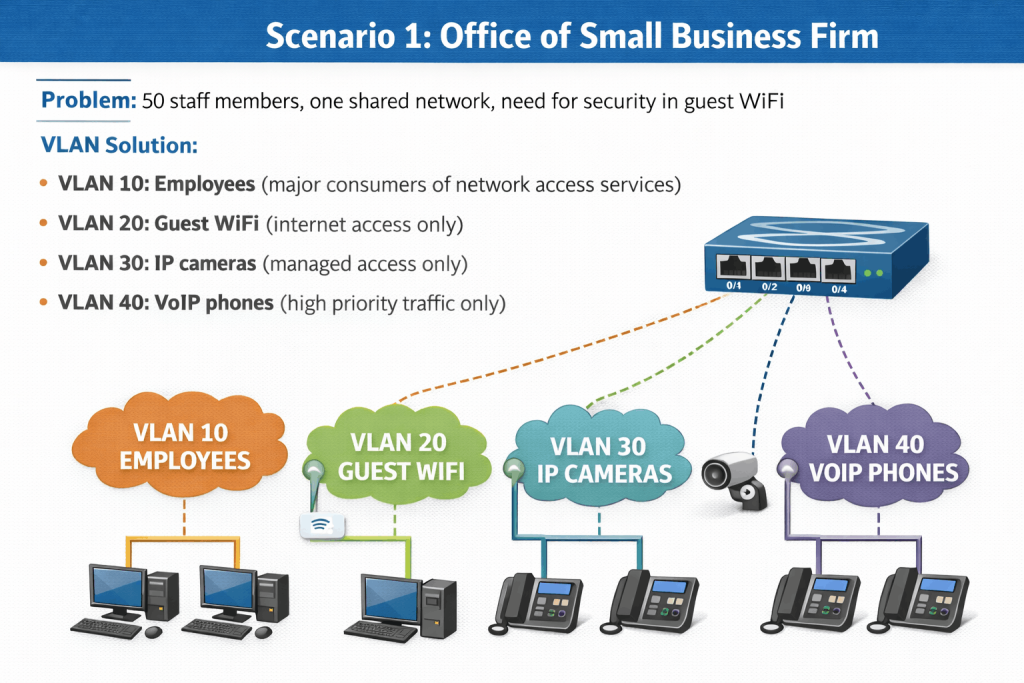
Results: 60% decrease in network traffic congestion, no access for guests to internal network, enhanced call quality
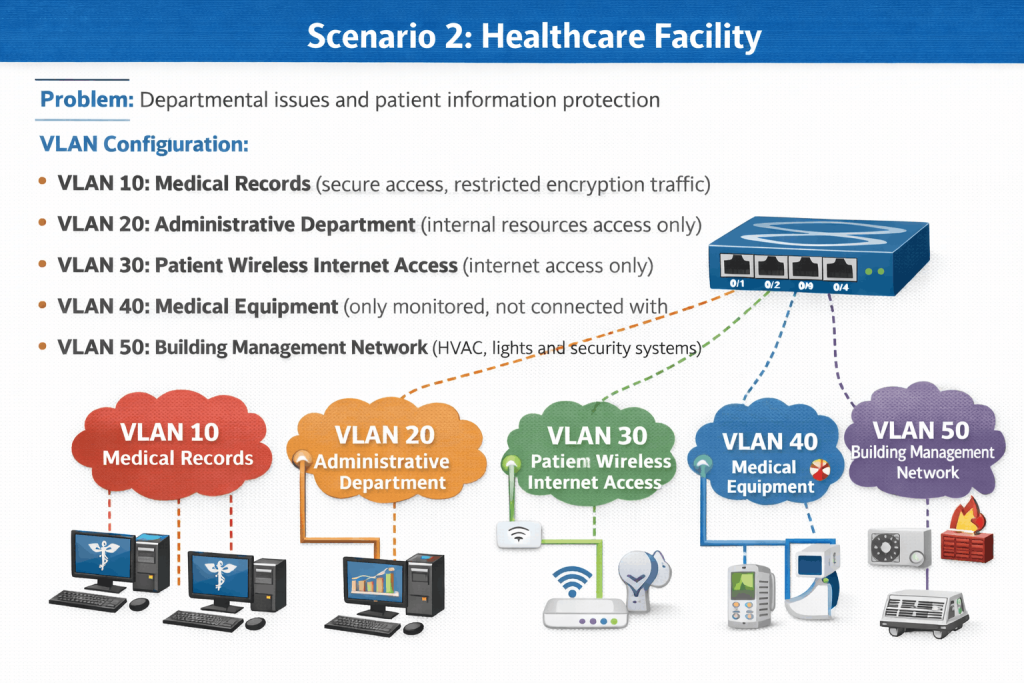
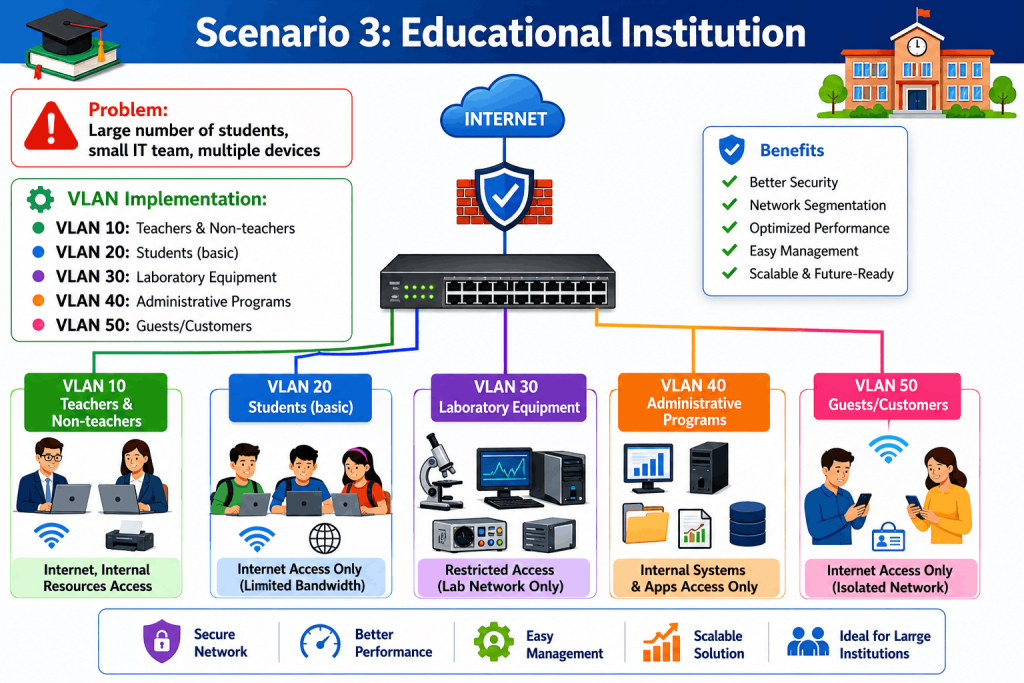
Effects: Improved use of resources, streamlined troubleshooting process, better security posture
VLAN Security and Performance Best Practices
1. Apply the Principle of Least Privilege
A user should only have access to those VLANs that he/she requires to do his/her job function. VLANs should also be checked periodically and any redundant access removed to ensure secure network operations.
2. Establish Separate VLANs for Important Services
Systems like database servers, payment processing systems and security services should be assigned different VLANs since separating them from the user traffic improves performance and security.
3. Adopt Secure VLAN Routing
VLAN routing can be done through the use of higher layer equipment than basic home or consumer routers. Layer 3 switches and Routers can be considered for efficient and secured VLAN operations.
| Layer 3 Inter-VLAN Routing Configuration: |
| Router(config)# interface vlan 10 Router(config-if)# ip address 192.168.10.1 255.255.255.0 Router(config-if)# no shutdown Router(config)# interface vlan 20 Router(config-if)# ip address 192.168.20.1 255.255.255.0 Router(config-if)# no shutdown |
4. Regularly Review and Update VLAN Configuration
The environment will continue evolving, and so should your approach to handling VLAN configuration. You should carry out reviews every three months concerning VLAN members, access control policy, performance metrics, and audit log.
5. Maintain Proper Documentation
Documentation is necessary concerning VLAN ID and name, IP address for each VLAN, access control policy, and any changes to the VLAN.
Conclusion
In today’s digital environment, where cyberattacks, security threats, and network outages can significantly impact business operations, VLANs are no longer optional. They have become an essential technology for enhancing network security, performance, efficiency, and overall reliability.
VLANs not only ensure improved security, but they also bring a number of benefits to a business environment, including increased network responsiveness and better network performance, which translate into more satisfied users, lowered costs and improved resource allocation.
It is safe to say that VLANs are easier to configure, deploy and manage compared to many other technologies in use, especially if the network administrator is using modern hardware, such as managed switches.
Regardless of whether you need VLANs for the sake of increased network performance, for the purpose of security measures or to satisfy requirements, VLANs are worth considering, and can bring a lot of benefits.
Recommended Read
Frequently Asked Question!
VLANs have their own benefits compared to a router since they provide more advantages concerning the network segmentation and the efficiency of the process itself. Routers are used at an IP level while VLANs work at a data link layer providing more control options without any other additional equipment.
The three main advantages of VLANs are improved security, reduced broadcast traffic, and simplified network management.
Improved Security – VLANs isolate users and devices into separate networks.
Reduced Broadcast Traffic – VLANs create separate broadcast domains, reducing unnecessary traffic.
Better Network Management – Devices can be logically grouped regardless of their physical location.
VLANs are primarily configured on switches to create separate Layer 2 broadcast domains. Routers can interact with VLANs using subinterfaces for inter-VLAN routing, but the VLAN itself exists on the switch.
The use of a VLAN is the division of networks into logical partitions that will enhance security, improve performance, and provide effective resource allocation within a network. VLAN itself is a broadcast domain. VLANs are used to divide a large broadcast domain into multiple smaller broadcast domains.
The number of VLANs that can be created on a switch depends on the switch model, hardware resources, and software version. According to the IEEE 802.1Q standard, VLAN IDs range from 0 to 4095, allowing a maximum of 4094 VLANs.