
Today, most IT and non-IT organizations need network engineers who have the ability to combine technical knowledge with real-world networking experience. If you want to make a career as a network engineer, it requires more than just knowledge of theoretical concepts.
Whether you are a fresher looking to prepare for your first networking job, or an experienced networker looking to change your career path, Network engineer interview preparation is the key to success. Companies use various methods to assess the candidates, such as conceptual, configuration, and real-world scenarios, before hiring the best network engineers for their company.
This detailed Network engineer interview guide will enable you to know how to prepare, what technical area requires more attention, and the most common Network engineer interview questions asked during the interview process. Before we start, let us know about the basics.
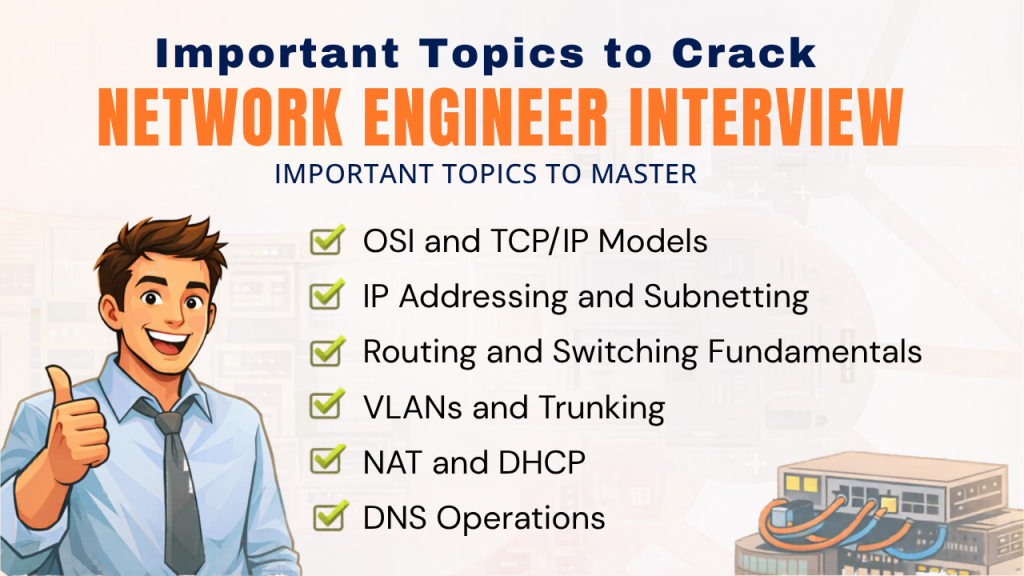
Important Topics to Crack Network Engineer Interview
Most Network engineer interview questions are based on Network fundamentals. The interviewer usually starts with the following topics to check if the candidate has a strong grip on Network fundamentals. So, let’s go through the topics first –
- OSI and TCP/IP Models: Understand each layer of these models and how protocols like HTTP, TCP, and IP work on these layers. These are also helpful in Network issues.
- IP Addressing and Subnetting: One should have a deep understanding of IP version 4, private and public IP ranges, subnet masks, and CIDR. Most Network engineer interview questions are based on IP calculations and subnetting.
- Routing and Switching Fundamentals: Network engineers should have a strong grip on Routing and Switching fundamentals.
- VLANs and Trunking: VLANs are logical sub-networks created to enhance Network Security.
- NAT and DHCP: NAT is necessary to allow private Network users to access public Networks using public IP.
- DNS Operations: DNS is necessary to allow users to access websites using domain names instead of IP.
Most Network engineer interview questions are based on these Network fundamentals.
Step 1: Build Strong Networking Fundamentals
Most interviewers assess the candidate’s skills using fundamentals to see if the candidate has a strong idea about Networking concepts. Many candidates make the mistake of focusing only on advanced topics. However, one should always be prepared with basic concepts.
Some example questions that are likely to be asked in networking interview are –
- What is the difference between the OSI model and TCP/IP model?
- What is the purpose of a VLAN?
- How does DHCP work in a network?
With a strong understanding of fundamentals, you will be able to seamlessly answer more complex Networking interview technical questions in the interview.
Step 2: Master Routing & Switching Technologies
Network engineers should have strong ideas about data transfer within a network and between networks. Interviewers often ask Routing and Switching questions during Network Engineer interview preparation.
Routing Protocols
Routing protocols are responsible for router-to-router communication and data transfer between routers. The major Routing protocols are:
- Static Routing – manually configured routes
- OSPF – widely used link-state routing protocol
- EIGRP – advanced Cisco routing protocol
- BGP – used for internet routing
Switching Concepts
Switching is responsible for data transfer within a Local Area Network using MAC addresses. Some of the major Switching concepts are:
- VLAN, VTP
- Spanning Tree Protocol (STP)
- Ether-Channel
- Port Security
- Layer 2 vs Layer 3 Switching
Having strong ideas about Switching concepts helps candidates confidently answer Networking interview technical questions.
Step 3: Develop Strong Troubleshooting Skills
Troubleshooting is one of the key responsibilities of network engineers, and most of the companies expect the individual to be able to effectively troubleshoot the network problems quickly. The interviewer usually evaluates the individual’s method of troubleshooting and not the answer or solution.

A network engineer appearing for interview must be familiar with the following troubleshooting method:
- Identifying the problem
- Checking physical connectivity
- Verifying IP configuration
- Testing connectivity using ping
- Using traceroute to check network paths
- Reviewing routing tables
- Checking firewall or ACL configurations
Some of the questions that may be asked of network engineers in the interview may be related to troubleshooting scenarios that may be presented in relation to actual networks. Therefore, it is important to be prepared to troubleshoot basics like – usage of correct IP address, properly functioning gateway connectivity & DNS is working well, issues related to firewalls and networking devices.
Step 4: Gain Hands-On Networking Experience

Networking is a practical work that cannot be mastered just through knowledge and theories. One must have hands-on experience to answer Network Engineer interview questions with more confidence and clarity.
For instance, recruiters may ask candidates how they would approach a particular networking scenario while implementation and troubleshooting. Some common tools that are commonly utilized are:
- Cisco Packet Tracer
- GNS3
- EVE-NG
These tools help the candidates create a simulated environment of an enterprise-level network and practice configurations. Many aspirants also gain practical experience in a real environment with the help of training provided by the Best Networking Institute in India like Network Bulls.
Step 5: Learn Modern Enterprise Networking Technologies
Networking technology is constantly changing and modern organizations use advanced networking technologies. Interviewers often ask questions related to emerging technologies in Network Engineer interview preparation. These include:
- Software Defined Networking (SDN)
- Network automation
- Data center networking
- Cloud networking
- Network security technologies
Understanding these technologies can help one advance his/her prospects in his/her career. Many networking professionals have gained knowledge of advanced technologies through training courses offered by the Best Cisco Institute in India.
Step 6: Highlight Certifications and Practical Training
CCNA, CCNP, networking security, data center certifications add to the candidate’s credentials when preparing for interviews for a network engineer position.
Recruiters often consider the candidates who have undergone training from the best networking institute in India or the best Cisco institute in India. As most of the institutes train them in actual networking environments.
Step 7: Follow Smart Network Engineer Interview Tips
Besides technical knowledge, there are some simple IT network engineer interview rules to follow. The tips include refreshing the basics of networking concepts, practicing troubleshooting, and providing clear and concise answers, and last but not least, sharing examples of what you have done in the lab or in the field. This can greatly help you in the interview. Also, one should develop communication skills to crack a network engineer interview, as it is considered one of the important soft skills.
Conclusion
This Network Engineer interview guide has discussed the importance of theoretical, practical, and troubleshooting knowledge for the interview. In a nutshell, the interview preparation should cover the right amount of theory, troubleshooting, and practical experience to do well in the interview.
Frequently Asked Questions (FAQs) – Network Engineer Interview
1. What is the OSI model?
The OSI model is a concept of how data travels across the internet in seven layers, including the physical, data link, network, transport, session, presentation, and application layers.
2. What is the difference between a switch and a router?
A switch is a networking device for computers within a network, whereas a router is for many networks and operates at layer 3 of the OSI model.
3. What is a VLAN?
A VLAN is a method of dividing devices into different networks, even though they are connected to the same switch.
4. What is NAT?
NAT is Network Address Translation, which allows many devices within a network to use the internet via only one IP address.
5. What is DHCP?
The DHCP is Dynamic Host Configuration Protocol, which automatically configures the networking settings of computers within a network.
6. What is the difference between TCP and UDP?
TCP is a connection-based protocol, whereas UDP is faster but does not guarantee data delivery.
7. What is DNS?
The DNS is the Domain Name System, which translates domain names to IP addresses so people can access websites.